Welcome to WordPress. This is your first post. Edit or delete it, then start writing!
Blog
-
The Power of Figma as a Design Tool: A UX Designer’s Perspective
Why Figma is a Game-Changer for UX Designers…
In today’s constantly changing UI/UX design world, having the right tool can either save or ruin a project. As a UX designer, you require a tool that is adaptable, teamwork-oriented, and speedy. Meet Figma—one of the most potent and flexible design tools in existence. With its cloud-based platform, real-time collaboration features, and a host of design capabilities, Figma has transformed the way designers create and iterate on digital products. In this article, we’ll explore why Figma is a must-have for every UX designer and how it stands out from the competition.
1. Cloud-Based Collaboration: Work Seamlessly with Teams

Real-Time Design Collaboration
Unlike other design tools that involve file sharing and version control, Figma is cloud-based. This allows designers, developers, and stakeholders to work on the same file at the same time, without the hassle of back-and-forth emails or clashing file versions. The feature of leaving comments on the design improves communication, minimizing misunderstandings and accelerating the feedback loop.
Cross-Platform Accessibility
Figma can function on any operating system that has a browser, be it Windows, macOS, or even Linux. The cross-platform capability makes it possible for designers and developers to view designs from anywhere in the world, making remote working more productive. Moreover, since changes and updates are being saved in real-time, there’s no danger of losing work as a result of crashes or using old versions.
2. Design Systems and Component Libraries: Guaranteed Consistency

The Power of Components
Components in Figma enable designers to build reusable UI components that can be updated in one place and across the whole application. Such a feature comes in handy during large-scale project development when there is a paramount need for consistency. With the use of components, designers have a consistent look and feel within several screens in addition to a faster design process.
Shared Libraries for Teams
Figma allows teams to author and share design libraries so that everyone works with the same elements, typography, and color schemes. This not only builds stronger brand consistency but also streamlines workflow efficiency. Rather than individually updating each instance of a button or icon, designers can just update the master component and changes will be reflected across all instances.
3. Prototyping and User Testing: Making Designs Come Alive

Interactive Prototyping Without Code
One of the most impressive aspects of Figma is its native prototyping feature, which enables designers to build interactive, clickable prototypes without ever writing a line of code. This simplifies the process of visualizing user flows and testing interactions prior to development.
User Testing Made Simple
With Figma’s prototyping feature, UX designers are able to easily share a link with stakeholders or users for comments. Test participants are able to engage with the prototype as if it were an actual app or site, gaining useful insights at an early stage in the design process. This saves development costs and guarantees that the final product is in accordance with user requirements.
4. Developer Handoff: Closing the Design-Development Gap

Code-Ready Designs
Figma makes it easier to perform a developer handoff by offering automatically generated CSS, Swift, and XML code for design objects. Developers can view elements, determine measurements, and copy code right from the design file, minimizing the need for further documentation.
Version Control and History
The days of working with several file versions manually are long gone. Figma has a version history where teams can monitor changes and revert to past versions if they want to. This functionality means that no work will be lost and that all members of the team are in sync.
5. Plugins and Integrations: Figma’s Expansion of Functionality

The Must-Have Plugins for Productivity
Figma has a vibrant ecosystem of plugins that supercharge the design flow. Ranging from accessibility checkers and color contrast analyzer tools to lorem ipsum generators and stock photo libraries, these plugins automate the design process and optimize productivity.
Third-Party Integrations
Figma also works well with tools such as Slack, Jira, and Notion, simplifying the process of handling design tasks and collaborating with cross-functional teams. This integration closes the gap between design and project management, making workflows smoother.
6. Figma vs. Other Design Tools: Why It Rules

Figma vs. Adobe XD
While Adobe XD is excellent for prototyping, Figma’s real-time cloud-based collaboration provides a winning advantage. Adobe XD uses local installation and manual file transfers, while Figma enables different users to simultaneously work on one file.
Figma vs. Sketch
Sketch has been a long-standing favorite among UX designers, but its macOS specificity restricts its accessibility. Since Figma is browser-based, it can be used across different operating systems, making it the better option for teams that operate on multiple operating systems.
Conclusion: The Future of UX Design with Figma
Figma has transformed the process of designers working together, prototyping, and producing high-quality digital products. Figma’s cloud-based design, real-time collaboration, component libraries, and easy developer handoff make it a go-to tool for today’s UX designers. Whether freelance, a startup, or in a large enterprise, Figma increases productivity and guarantees that design projects are handled with accuracy and efficiency. Figma has stayed afloat in the changing tide of designs and continues to evolve as the design industry goes forward.
-
Finding Your Flow: Staying Motivated When Work Slows Down
In the world of UX designers, functional discrepancies naturally occur when wireframes become prototypes. And when the pace slows down It’s so easy to feel stuck. no inspiration Or are you not sure how to make the most of your time? Instead of letting that downtime weigh you down Think of it as serendipity—just a blank canvas waiting to be created. It shows how self-motivated, productive and inspired a workflow can be when it is still.
1. Refocus on your personal growth.
When customer feedback delays or extends project deadlines Well, it’s the right time to practice your skills. As UX designers, we are in an ever-evolving industry. Where stagnation is not an option. Use this time to focus on growth. Start by evaluating your skill set. Are there design tools you intend to master, such as motion design in Adobe After Effects or advanced prototyping techniques in Figma? There may be courses in accessibility or data-driven design that can develop your expertise.
Learning initiatives don’t just add value to your work. But it also sparks inspiration along with reviewing old projects Evaluate your design decisions Look for opportunities for improvement. and record what you learn Creating a case study for your portfolio can be a really satisfying experience. Even to the point where you realize you may be seeing patterns or insights that you never noticed before. Growing in your free time is not just an opportunity but a necessity.2. Foster your creativity
As creatives, we tend to lose that creative energy whenever we are confined by timelines. The shutdown gave us a chance to reignite that spark. Let’s allow ourselves to play and experiment with ideas that are not necessarily aligned with the client’s brief but keep our imagination going.
One of the most effective ways to do this is by participating in a passion project. Create a mobile app based on the needs of a hypothetical user. Reinvent your website’s user interface or design tangible products The possibilities are endless. These projects don’t just help you stay inspired. But it also provides fresh content for your portfolio.
Plus, explore design inspiration. Go on forums like Dribbble, Behance, Awwwards, and connect with the work of fellow designers. and UX/UI trends. Let these inspirations help you create even more. and inspire your creativity to push the bounds of your designs.3. Connect and collaborate
Slow times are a great time to step out of silos and make connections within the design community. Collaboration and networking aren’t just about career enhancement. But it is also deeply motivating.
Start by engaging online communities or attending design meetups in your neighborhood. Discussion about UX trends, challenges, and innovations are quite energizing, keeping you current and motivated if you share experiences with people and learn from one another.
or working with a co-worker or co-worker Organize a brainstorming session Organize a design challenge or work on a project together These kinds of interactions can lead to unforeseen insights. and renew your passion and momentum.4. Enhance Your Workflow
Downtime is the perfect opportunity to audit and improve your processes. A smoother workflow not only saves time in the future but also keeps you motivated by eliminating unnecessary friction.
Start by identifying bottlenecks. Are there repetitive tasks that could be automated? Could your file organization system use a revamp? Tools like Zeplin, Miro, and Notion can help optimize your design and collaboration processes.
Another way to enhance your workflow is by creating templates or style guides. Whether it’s a reusable wireframe kit or a comprehensive design system, these assets streamline your work and ensure consistency across projects. Investing time in improving your processes now will pay off when the pace picks up again.5. Practice self-care and recharge
Motivation isn’t just about work. But it’s also about creating balance. Slower periods provide an opportunity to recharge both body and mind. To make sure you’re ready for the next wave of projects.
Start by establishing boundaries between your work time and personal time. Downtime should be spent on hobbies, exercise, or just sleeping. A rested mind is more creative and motivated. Remember, burnout is not only caused by being overworked but also because of a feeling of underproductivity.
Think about your goals too. Are you aligned with your career aspirations? If not then Use this time to recalibrate, journaling, mind mapping. or even a casual conversation with a mentor can help clear your path and rekindle your passion.Conclusion
It’s natural during slowing work to feel this drag in motivation. But one will be able to bring themselves out of this because you can turn lulls around into valuable opportunities just like that. Remember; in being a UX designer, your adaptability, including resilience, are quite major strengths-and they tend to shine brightest when a certain ebb and flow will be found in how a person does their thing.
-
5 Mind-Blowing Websites on Internet
Do you feel tired flipping over and over on the same old websites that keep cropping up? Wish to experience something new that will rock you over the internet world? Do not worry for this post where I excitedly unveil some of the mind-blowing websites that get you at the next best internet-browsing level-they present something unique really appealing to all curious souls everywhere.
Get ready to take the virtual tour that will give you an appreciation of incredible creativity and innovation found on the internet. Whether you are an old-timer in surfing the web or just coming to this medium, surely these websites would leave you amazed and inspire you to look deeper. Let us now get into the wonderfully interesting world of these five amazing web destinations!1. Internet-Archive

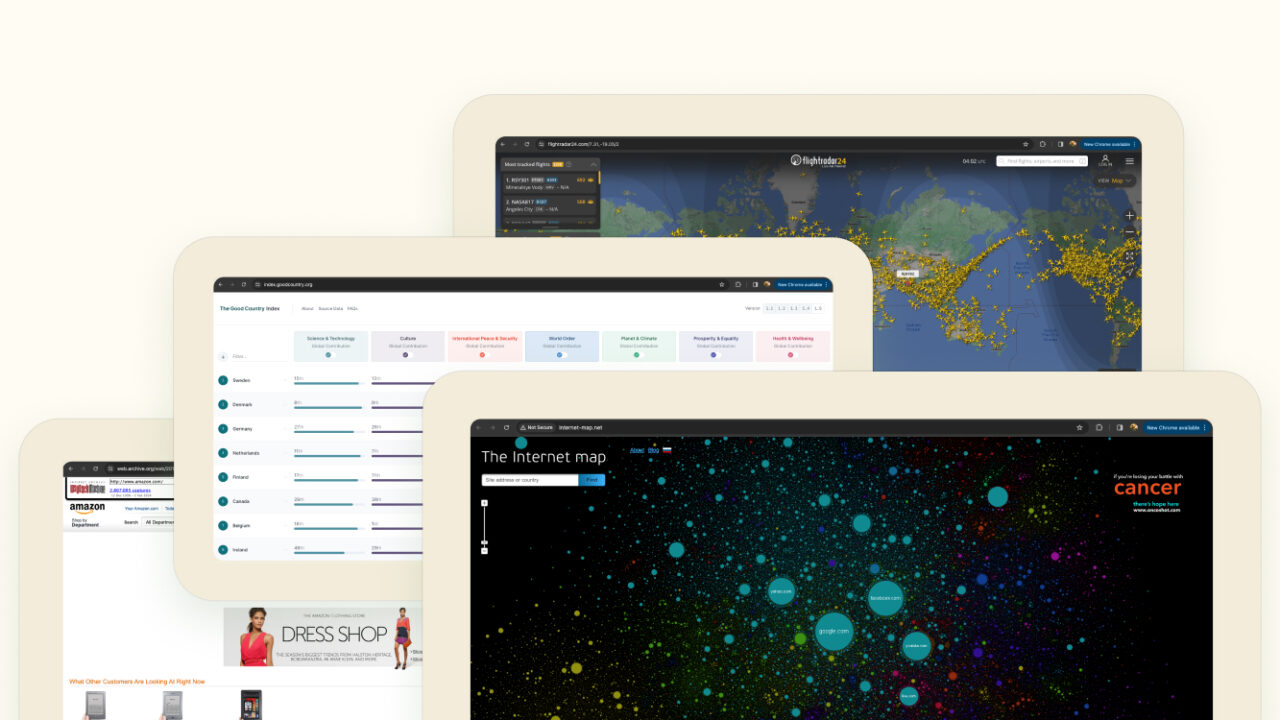
Imagine you want to see what your favorite website looked like way back in the late ’90s or any time since then. Enter the Wayback Machine! It’s like a time-traveling wizard for the internet!
It’s this amazing utility by the Internet Archive: it takes snapshots of websites over time. You could head over to web.archive.org, type in the URL, and voila! You get to see that webpage at different points of history.
This thing is loved by researchers, history buffs, and anybody interested in the evolution of websites. It is like digging into the past of the internet. It’s all free to use! The Internet Archive, a non-profit, has opened it up for everyone.
The Wayback Machine is like a digital time capsule, preserving the history of the internet. It’s there to make sure we don’t lose out on the gems of the online world as websites change or disappear. But, it’s not perfect. Dynamic stuff like interactive features might not show up, and some websites might have restrictions. Still, it’s a pretty nifty tool for exploring the internet’s journey over the years.2. The Good Country Index

URL: https://index.goodcountry.org/
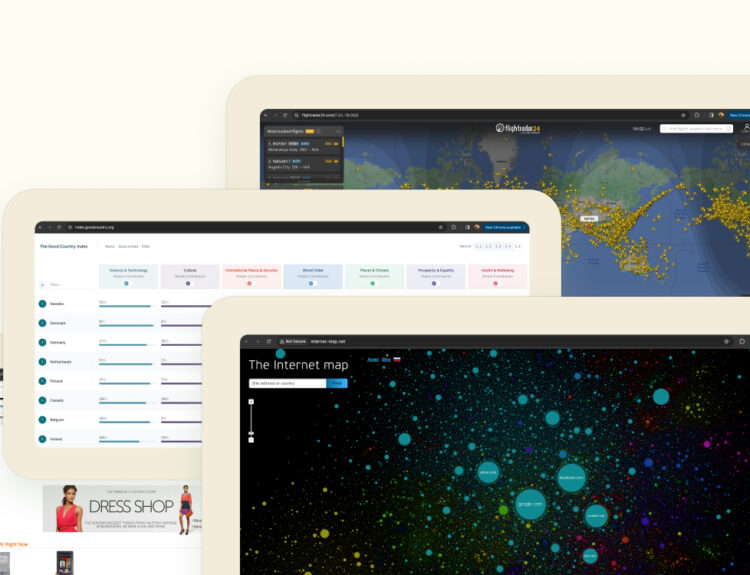
Is your idea of a ranking similar to one based on the Good Country Index? It’s actually globally measured to rate how well each country contributes to overall human well-being. Sort of like a report card in reverse, this ranking would review whether or not countries add much good to the earth and its inhabitants instead of being about success in overall ratings. It tracks some aspects like Science and Technology, Culture, Peace, Security, and the others.
They do this by digging into data from big organizations like the United Nations. They analyze how much a country is pitching in across areas like health, equality, the environment, and all those good things.
The basic idea is to nudge countries to not only think about their own interests but also extend a helping hand to global challenges.3. Flight Radar24

URL: https://www.flightradar24.com/
It’s this super cool online thing that lets you track flights in real-time, like a worldwide GPS for planes! You can see where a flight is, how high it’s flying, how fast it’s going — basically, all the cool details.
This would be an interactive map. You could zoom into any place, click on a plane, and it would bring up more information about what airline, what flight number, kind of plane, where did it take off from, where is it going, and what’s going on with it at that particular moment.
And the best part is it is not just for the aviation nerds but anyone can use it. Want to see your friend’s flight? Just pop in the flight number. Curious about the planes flying over your city? Check out the map.
FlightRadar24 even has mobile apps, so you can track flights on your phone while you’re out and about. Perfect for those moments when you see a plane in the sky and wonder where it’s off to.
The magic comes from data like ADS-B signals and radar, so not every single plane might show up. But still, it’s pretty fascinating to watch the world’s planes crisscrossing the skies in real-time.4. The Internet Map

The Internet map is a website created by Ruslan Enikeev where websites are like little islands on a map, and they’re grouped together based on what they’re all about. You can click around and explore, and each island (or node) is like a website. The bigger the island, the more popular the website is.
5. HE 3d network map

URL: https://www.he.net/3d-map/
It is a product or service provided by a multinational Internet service provider named Hurricane Electric (HE) through which they might be displaying, as well as mapping, three-dimensional structures of their network infrastructures. In general terms, a network map represents the way in which network elements communicate with each other, from servers to routers to data centers. A 3D network map would be more of an immersion and detail because users will be able to look at their network topology in three dimensions.
Hope you found these resources useful.
-
Top 5 Visual Design Trends of 2025
The digital world is constantly changing and fast. And those of us involved in UX design are at the forefront. In 2025, visual design is an era of enormous change taking place. Both technological, sociological and user generated. Staying ahead of the trends isn’t just a matter of style. It’s about creating an experience that pleases users. Let’s take a closer look at the top five visual design trends that will emerge next year.
1. Realistic 3D and AR experience

In 2025, integrating 3D design with augmented reality is nothing but a given. With the number of AR-enabled devices and platforms increasing, consumers will demand visual designs with depth, interactivity, and immersion. From e-commerce to education, 3D elements are transforming the user experience.
Consider applications related to furniture. It can see a 3D sofa in the living room thanks to augmented reality. It’s about breaking down screen barriers and bringing design into the user’s real world. Realistic combination of textures, lighting and movement Create sensory richness with a personal and tangible feel in 3D and AR products. Plus, tools like Unity, Blender, and ARKit make it easy to design these experiences.
The challenge for UX designers is to strike a balance between beauty and functionality. Overloading the interface with too many 3D elements can sometimes degrade performance. As this trend grows Simplicity also tends to stand out in 3D space.2. AI-powered personalization

Artificial intelligence is a popular industry conversation, but 2025 will drive greater personalization in the realm of visual design. Consumers expect designs that fit their preferences, behaviors and needs – smoothly and intuitively.
A streaming app that adjusts its interface based on the user’s viewing habits. Colors, fonts, and layouts change dynamically based on mood or time of day. That level of customization creates a deeper emotional connection between the user and the brand. AI-powered insights can help designers create visuals that speak directly to individual users. This increases satisfaction and loyalty.
However, personalization must be done responsibly. Transparency about how user data is used is key to building trust. UX designers should focus on creating adaptive interfaces and clearly communicating these changes to users. Therefore, users feel empowered rather than being followed…3. Biophilic Design Elements

As the world increasingly prioritizes sustainability and mental well-being, biophilic design elements are taking center stage. This trend draws inspiration from nature to create calming, harmonious user interfaces.
Incorporating organic shapes, earthy color palettes, and natural textures can evoke feelings of serenity. Whether it’s a finance app that uses shades of green and flowing lines to reduce stress or a wellness platform with plant-inspired animations, biophilic design connects users to nature, even in a digital space. Such designs promote mindfulness, making them especially relevant in today’s fast-paced world.
UX designers adopting this trend should focus on subtlety. Overusing nature-inspired visuals can feel forced or overly thematic. Instead, integrating these elements thoughtfully—perhaps as background accents or micro-interactions—ensures a balanced and effective user experience.4. Maximalist Typography

Minimalism has governed design for years, and 2025 greets a refreshing counter-trend: maximalist typography, bold, expressive, unapologetically artistic, and making text take center stage in the user interface.
Think oversized headlines, experimental typefaces, and vibrant color gradients. Maximalist typography is about storytelling and evoking emotions. For instance, a campaign website might use dynamic text that morphs and moves as users scroll, creating a narrative journey. It’s a perfect fit for brands looking to stand out and leave a lasting impression.
However, readibility still comes first. Creativity and clarity will have to be balanced together by the designers. By experimenting with type, it should still let users consume the content easily. Testing with tools such as a contrast checker and responsive testing will always be very essential for accessibility.5. Retro-Futurism

Retro-futurism—the art of mixing nostalgia with forward-thinking aesthetics—is set to dominate 2025. This trend pays homage to the past while embracing futuristic technologies, resulting in a unique visual style that feels both familiar and innovative.
Expect neon color schemes, glitch effects, and pixelated textures reminiscent of the old internet days. At the same time, these elements will be woven into modern layouts and slick animations. For example, a fintech app can use retro-futuristic visuals to make intimidating financial concepts more approachable and engaging.
To leverage this trend effectively, UX designers should identify the specific emotions or memories they wish to evoke. Retro-futurism works best when tied to a brand’s narrative, creating a cohesive and memorable experience for users.Conclusion: Designing for the Future
As UX designers, staying ahead of visual design trends is essential for crafting interfaces that delight, engage, and inspire users. The trends of 2025 immersive 3D and AR, AI-driven personalization, biophilic elements, maximalist typography, and retro-futurism—reflect the dynamic interplay between technology, user needs, and cultural shifts.
But to embrace these trends, thought needs to be applied. It is not about doing what is in fashion; it is about knowing their impacts on user experiences. Adding these innovations strategically can thus ensure designs that look great, yet enhance functionality and the emotional connection.
-
How to Maximize Creativity for Your New Design Project
A new design project always feels exciting, yet scary at the same time. Creativity is very important for UX designers. It helps us make designs that users like. But creativity doesn’t just happen; you can make it better by working on it. Here, I will share simple tips to help you be more creative for your project.
1. Make a Good Place for Ideas
Creativity grows in a good environment. Before starting your project, make a place and mood that gives you ideas.
Start with your room. Keep it clean and nice. Put things like plants or pictures that make you happy. A clean place makes your mind clear too, so you can think better.
In addition, take care of your mind. Start the day by relaxing or writing down your thoughts. Listen to music, read books, or look at art. These things may give you new ideas for your design.2. Know Your Users Well
Good design originates from knowing what users want. Learning about the users can actually help you brainstorm creative ways in which to solve their problems.
Think like a user. What does he or she need? What makes them happy or upset? Have a word with them, read their feedbacks, and see how they are using things. This will allow you to pinpoint problems you could fix with your design.
Do not merely follow old ideas. New ideas come when you ask questions. If you can find things others missed, then your designs are going to be better and different.3. Team Work
With other people around you, your creativity will become higher. Other people may also share ideas that you did not think of before.
Talk frequently to your team. They can give you an idea that could help you create something new. Use Figma or Miro, which can facilitate easy sharing and working together with your team. Listen to their comments about your design; they might make your work better.
You can also join design groups online or in person. It is possible to get inspiration for your own project by seeing the work of other designers.4. Try New Tools and Ways
Creativity is improved as you try out new things. Trying out other tools and ways of doing something brings in fresh ideas.
Start drawing your ideas on paper. This is simple yet very helpful. Use Figma or Adobe XD to make the design. In fact, you might discover some new ways by trying out different tools.
Don’t be afraid to play with fun things. Stories, games, and moving designs can enrich your project. That color, font, or animation play could impress many people.5. Improve Your Work
You do not need to get it all right the first time. Creativity is trying again and making things better.
Test your design early. Show it to users and see what they think. Their feedback can give you new ideas. It’s okay if something doesn’t work—you learn from mistakes.
Ask others for their opinions. Whether it’s users or your team, their feedback helps you find problems and improve your design. Keep an open mind, and you will come up with even better ideas.Creativity Is a Journey
Creativity in a design project is how you think and how you work. Make a good space, learn about your users, work with others, try new tools, and keep improving. Creativity is a muscle-the more you use it, the stronger it gets.
-
The Creative Compass: Why Mentorship is Your True North
Creative journey is like an infinite long journey full of ideas, challenges, and opportunities. But even the bravest explorers need their guiding star. That’s when mentorship comes-a steady hand to navigate all twists and turns of creative journeys.
Let’s talk why having a mentor changes not only your work but also your entire creative process.1. A Mentor Lights the Way
Creativity often seems like wandering through a fog. You have the skills, the vision, and the passion, but sometimes, the direction is still foggy. A mentor offers clarity by sharing insights drawn from their own experiences.
A mentor is someone who has been down the road you are traveling. They have faced similar challenges, stumbled along the way, and learned valuable lessons. Their stories can help you avoid common mistakes and find your footing faster. For example, a mentor might help you refine a design idea or show you how to pitch your concepts more effectively.
Even more importantly, mentors act as sounding boards. The moment you share your ideas and get constructive feedback is when you learn what works and what does not. This type of guidance makes all the difference, particularly in creative fields where things are pretty subjective.2. Opening Doors to New People
The creative industry thrives on relationships. Whether you’re a UI/UX designer, a visual artist, or a budding writer, knowing the right people can open doors to opportunities that hard work alone might not.
Mentors often already have established networks. With them, you can introduce you to industry leaders who can connect you with actual clients or recommend you to exciting projects. These introductions come with a bonus: endorsements from credible people, very valuable when trust is considered.
But it’s not who your mentor knows; it’s how they grow and develop their relationships. There are so many lessons in that, from how to compose professional emails to managing the collaboration process. It will help you build meaningful connections using that person’s approach as a playbook.3. How to Build Confidence
Let’s face it – imposter syndrome pays each creative a visit at some point. You have likely questioned your skills, doubted your choices, or even felt you don’t measure up. A mentor will help quiet those voices of self-doubt.
When someone you look up to believes in you, it is an attitude and confidence booster. His words of encouragement motivate you to take on challenges you otherwise would have sidestepped. He stretches your limits to step beyond comfort and tackle bigger challenges.
For instance, think of presenting your portfolio to decision-makers. With the help of your mentor, you can improve to a confident presentation of your skills. These small wins add up over time, helping you feel more assured when facing new challenges.4. Growth Beyond Your Craft
Mentorship is not only about professional skills; it is a very personal journey as well. The influence of a mentor often transcends into decision-making, perspective building, and even life lessons.
For example, take big decisions: should you take a stable but less creative job, or should you try to specialize in a new direction? A mentor can give you insights that help you weigh your options more clearly. They’ve probably faced similar crossroads and can share what worked for them-and what didn’t.
Mentors can also help you create habits that contribute to long-term growth: doing your sketchbook or more extensive reading or carves time for recharging out of the work-life perspective from which their advice might emerge. These small habits are actually huge over the length of time.5. Ripple in Water: Paying Forward It
There is beauty in giving-and, this ripple effect is the great value of mentorship once having such experienced pay offs that one would want and pay to be on the giving-end-their cause ends-and through serving, learning and deepened craft mastery.
Guiding someone forces you to express what you know and reflect on your own journey. Sharing your experiences, explaining concepts, and helping someone overcome challenges strengthens your expertise.
The other significant importance is leaving a legacy. This is a result of your insights and encouragement. In some cases, it even creates ripples that move far beyond you. Mentoring will thus provide a way in which the creative community grows in stature and in energy.Final Thoughts
If you don’t have a mentor yet, now’s the perfect time to find one. Look for someone whose journey aligns with your goals. Reach out with sincerity, express your eagerness to learn, and be ready to invest in the relationship. And if you’ve been lucky enough to have a mentor, consider becoming one yourself. In the grand adventure of creativity, mentorship is the compass that keeps you moving in the right direction. Whether you’re seeking a guide or becoming one, mentorship will enrich your journey and leave you better equipped for the challenges ahead.
-
Personal Projects To Help You Thrive Creativity Beyond Client Work
As a UX designer, our daily grind often revolves around client briefs, deadlines, and iterations. While client work is essential to building a career, it can sometimes stifle creativity. Enter personal projects—the playground where UX magic happens, free from constraints. Let’s dive into how these passion-fueled endeavours not only sharpen your skills but also enhance your professional journey.
1. Revitalizing Creativity Through Personal Projects
Client projects have their own set of rules, and that’s okay. But this structure can sometimes be confining. Personal projects give you a chance to break free from the mold. Want to try a really bold typography style or design an app for your dream Mars hydroponics mission? Go for it! Personal projects give us a chance to get back to the core of why we became UX designers: solving problems creatively.
Engagement in personal projects is reviving your creative juices. For example, it may be creating a mock-up redesign of your favorite app. There is no stress of having to present the work to a client. You are free to solely design for the user and their needs. It usually results in innovative concepts.2. Improve your skills and portfolio
Work on personal projects that sharpen your design skills in ways you least expect. Maybe you have always wanted to master animation in Figma or explore AR/VR interfaces. Personal projects give the perfect sandbox to experiment in. These projects help your technical expertise to go stronger, but also keep you updated about industry trends.
These projects are also great portfolio builders. Personal projects often shine because they reflect what excites you most as a designer.3. Building Empathy Through Self-Defined Problems
One of the most satisfying aspects of personal projects is that you can select a problem you care about. In contrast to client work, where the problem is defined for you, you are able to dig deeply into areas that you genuinely care about—be it sustainability, human factors, or social justice. For example, designing a user-friendly interface for a hydroponics system makes you consider the everyday challenges of urban farmers. This process builds empathy and enhances your ability to create user-centered solutions. Solving self-defined problems grows your understanding of users, ultimately making you a better designer.
4. Improving Collaboration and Networking Skills
Personal projects open quite a few doors for opportunities to collaborate. You’ll reach out to a developer or another designer to share your side project. This is broadening your network and familiarizing you with other perspectives, as well as different types of workflows. Personal project collaboration mirrors real-world teams, making you a great candidate to work in diverse groups.
Sharing your personal projects on Behance, Dribbble, or LinkedIn can lead to some unexpected opportunities. There are many cases where designers get freelance gigs or full-time jobs based on the visibility of their personal work. These projects show initiative, passion, and creativity—desirable qualities for every employer.5. Improving Long-Term Career Growth
Personal projects are investments in your career. Over the time, these efforts build your reputation as a thought leader in the UX community. Creating case studies about your projects demonstrates your problem-solving approach and thought process.
Personal projects lead to self-discovery. You will identify areas of improvement by reflecting on your journey and align your career path with your passions. Whether it’s starting a blog, designing for societal issues, or innovating on Mars exploration interfaces, these projects are stepping stones to your career.Conclusion
There is a huge potential in personal projects. They are not just about an addition to your portfolio but they are the new explorations and exploring the passion for design. So, what are you waiting for? Pick an idea, grab your tools, and start designing a good personal project.
-
Everything you need to know about the Stakeholder Interviews
Well, the first thing you need to do is understand what is stakeholder. The definition goes like this “A person, group or an organization that has interest in the product or the organization.”
But what I understood from my experience, as I have worked with several IT firms is that “a stakeholder is any individual who is involved in the process of development of the product and the person who is going to use that product.”
Not all stakeholders are equal. Some stakeholders have high authority and others have low authority. For example, a company’s founder will have a high authority than a regular employee.
Also, some stakeholders will have most of the information you need…
about your users like sales department,
about technology and constraints like engineering department,
about business like product managers.Business Requirements
Defining business requirements will help you understand the reason behind the project existence and it will lead to a definition of project vision. That vision will be the based of your decision-making and it will be used throughout the design process.
These business requirements would include…
- Product vision
- Budget
- Schedule
- Technical constraints
- Business goals
- Customers & users
- Learning about competitors
- What they are trying to achieve
- Success criteria
Preparing for the interview
The first step to any kind of research is to make your plan, it will help you to focus on your goal, focus on time & budget.
In your plan you can include the following:
1. Set up the research golas and objectives
Here you will have to conduct interviews. And identify if the interviews will help you understand your customers and identify technological constraints or help you learn about the business.
2. Identify stakeholders that you will meet
Based on your objectives and goals, you will select your stakeholders that will give you what you are really after. But don’t miss the high authority stakeholder’s point of view.
3. Identify team roles and responsibilities.
This is an essential part to agree upon with your team to make sure that all responsibilities are covered and each team member has role. Responsibilities could be taking notes, recording or interviewing.
4. Consider the materials and logistics
To avoid situations like “We’ve missed the recorder” or “Oops! The notes are not here”. You need to plan and prepare your materials and what you will need during the interviews, like papers, pens, sticky notes and audio recorders.
5. Schedule the interviews
Scheduling your interviews with stakeholders in a timetable make it easy for you to plan any other activities and avoid conflict in time slots if you are conducting a lot of interviews.
6. Calculate the budget
Calculate all the expenses that will be needed, like material to buy, travel costs or any other expenses.
7. Prepare the script
The interview script is simple, you just need to introduce yourself & your team, mention the objectives from this interview and encourage the stakeholder to talk.
8. Build the field guide
The field guide is a set of questions that you will ask the stakeholder.
Here is a set of questions you can ask:
- What is your role in this project?
- Who is your product for?
- What is the product supposed to be?
- How will the product success be measured?
- What are the goals you need to achieve from this project?
- How do you want people to see your brand?
- What is unique about your organization?
- Who are the biggest competitors and what worries you about them?
- How do you expect to differentiate this project?
- How large is the engineering team assigned to this project, and what are their skills?
- Could you draw a diagram and tell me in lay terms how the existing system works?
- Who is typically involved in the purchase decision?
- Why do customers buy a product like this one, and why this one over a competitor’s?
- What things do customers complain about or ask most often and why?
- What are the most common problems your users face?
Conducting the interviews
The third step is to start the real work, you are now ready with all the needed tools to conduct successful interview with your stakeholders.
1. Crossing the threshold
Your stakeholders are not 100 percent clear on what’s expected of them, some of they may your name and your company and some of them doesn’t know anything, they are just told that they will meet you to talk about the project. Just introduce yourself, your team and the company. Also arrange the seat so that you and your fellow interviewers are near each other. In order to maximize the engagement among all parties.
2. Restating Objective
Thank the stakeholders for their time and start explaining why you are here and what are the objectives of this interview. It will also be great to tell the stakeholder about the agenda for the meeting.
3. Accept the awkwardness
Not all people are the same, some stakeholders may be sociable and start telling stories and others may show some resistance. Be patient and keep asking the questions and keep accepting, acknowledging and appreciating their responses.
4. The tipping point
You will get there when people shift from short answers and responses to stories and long answers. In this stage you will get lot of insights and very useful information, you may keep your most important questions for this stage.
5. Reflection and projection
At this point, stakeholder has been immersed in the topic and built a good rapport with you. It’s your chance to benefit from this and asks him about the future, his predictions and his dream goals for the products.
6. The soft close
At some point you need to end the interview. Keep your eyes and brain in interview mode until you are fully departed. At this moment a crucial information is revealed just as the patient is about to depart.
Including the Activities
1. Requirements Workshops
A collaborative method for developing your project brief. You gather the stakeholders to discuss the brief, do exercises designed to get you a clear understanding of the project. This workshop leads to shared understanding of your project and the problems it aims to solve. This activity also helps you building a sense of teamwork with your client.
2. Crazy 8’s
A brainstorm exercise to find trends and preferences. Get everyone to sketch 8 product ideas or features in 5 minutes. Then have everyone score each idea, the result will let you see trends and preference.
3. Empathy Map

This exercise tells you how the product makes customers feel and what & what should they do? It records how stakeholder and customer will think, feel and do. You set a standard to compare against usability testing and user analysis.
What user will say?
What users will think?
What users will do?
What user will feel?
What problem does it solve?
What are the reasons?
What are the user needs?Documenting the findings
As this information will be used in all stages of the project, you need to document it for yourself and your team or anybody involved in the project. You will also need to keep all the audio recordings, transcript and photos of your notes.
Conclusion
Stakeholder interviews aren’t just another step in the design process—they’re an opportunity to align goals, gather insights, and build strong relationships. These conversations play a critical role in uncovering key information that shapes the direction of a project. By asking meaningful questions, listening carefully, and fostering open dialogue, you create a shared understanding that benefits both the team and the users. When done well, stakeholder interviews lay the groundwork for successful collaboration and thoughtful, impactful design outcomes.